 Past the textbook
Language learning that starts after the basics.
Viglot drops you into real-life scenarios built around what you care about, coaches your speaking with AI feedback, and lets you practice full conversations with an AI tutor — across 40+ languages, from conversational to near-native.
Now on iOS and Android
Free to start. Try every Premium exercise free during the trial.
Why most learners stall after the basics
The app runs out of ideas
Once you’ve covered ‘where is the library’ and ‘I’d like a coffee,’ most apps just repeat the same drills with bigger words. No new situations. No real depth. Nothing that stretches you.
Speaking practice that doesn’t actually listen
A cheerful ‘good job’ whether you nailed it or mumbled. No actual listening. No AI conversation with a goal you had to accomplish. No real signal whether your message came through.
Lessons with nothing to do with your life
Generic chit-chat about hobbies you don’t have, jobs you’ll never work, trips you’re not planning. Nothing sticks, because nothing matters to you.
Built around how people actually learn a language
No baby sentences. No feel-good drills. No speaking practice that ignores what you said. Real tools for real fluency.
Every lesson is a scene from real life
Tell Viglot what you care about — football, medicine, cooking, negotiations, anything. It builds full scenarios around those interests: a contract dispute over dinner, a doctor’s visit, a conversation in a stadium. Not drills. Situations that feel like they could happen to you.
Conversations that score you on whether you succeeded
Speak with an AI tutor that has a mission — buy the train ticket, explain the symptoms, negotiate the price. It judges whether you pulled it off, flags what worked and what didn’t, and tells you exactly what to try next time.
17 exercise types — a real progression, not a shuffle
Each chunk of vocabulary moves through a deliberate arc: introduction, active practice, mastery. Flashcards and multiple choice early, then fill-in-the-blank, error correction, sentence reconstruction, and speech. Every step builds on the last.
Speaking practice with AI feedback
Read each phrase aloud and record yourself. The AI listens and gives you feedback on your delivery — so you build the habit of speaking, not just reading. Combine it with the live AI conversation tasks for full-sentence fluency.
A review schedule that treats your time seriously
The same spaced-repetition method medical students use to memorize thousands of terms. Cards you struggle with come back sooner. Cards you master fade into longer intervals. Nothing wasted.
Difficulty that tracks you — not just your level
The system watches your success rate, your attempts, and your speaking practice, then adjusts — not just by your overall level. Struggling? It pulls back. Cruising? It pushes harder. You’re always training at the edge of what you can do.
Lessons shaped around you — with an image and a native voice for every phrase
Most language apps ship a fixed curriculum: the same lesson tree, the same topics, the same examples for every learner. Viglot generates your lessons around what you actually care about — football, medicine, negotiations, anything — at your CEFR level, in any pair of 40+ languages. And every phrase comes with its own matching image and a native-quality voice, every time.
- A fixed curriculum — the same lesson tree for every learner
- Topics chosen by the textbook, not by you
- A short list of supported language pairs, usually from English
- Image + audio paired for some phrases, often missing on others
- Lessons generated around your interests — football, cooking, medicine, anything you ask for
- Difficulty matched to your CEFR level and live performance
- Any pair of 40+ languages, in either direction
- A matching image and native-quality voice for every phrase — always
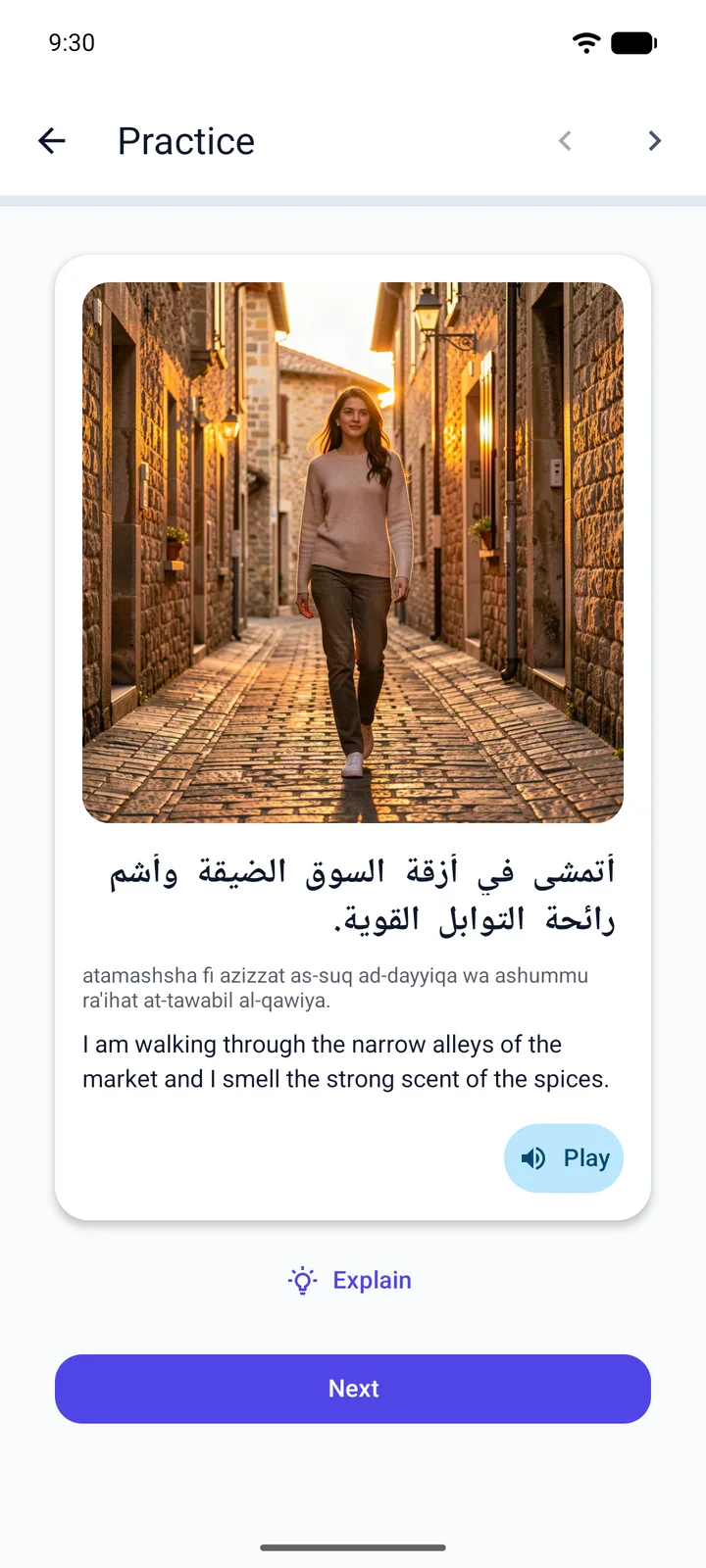
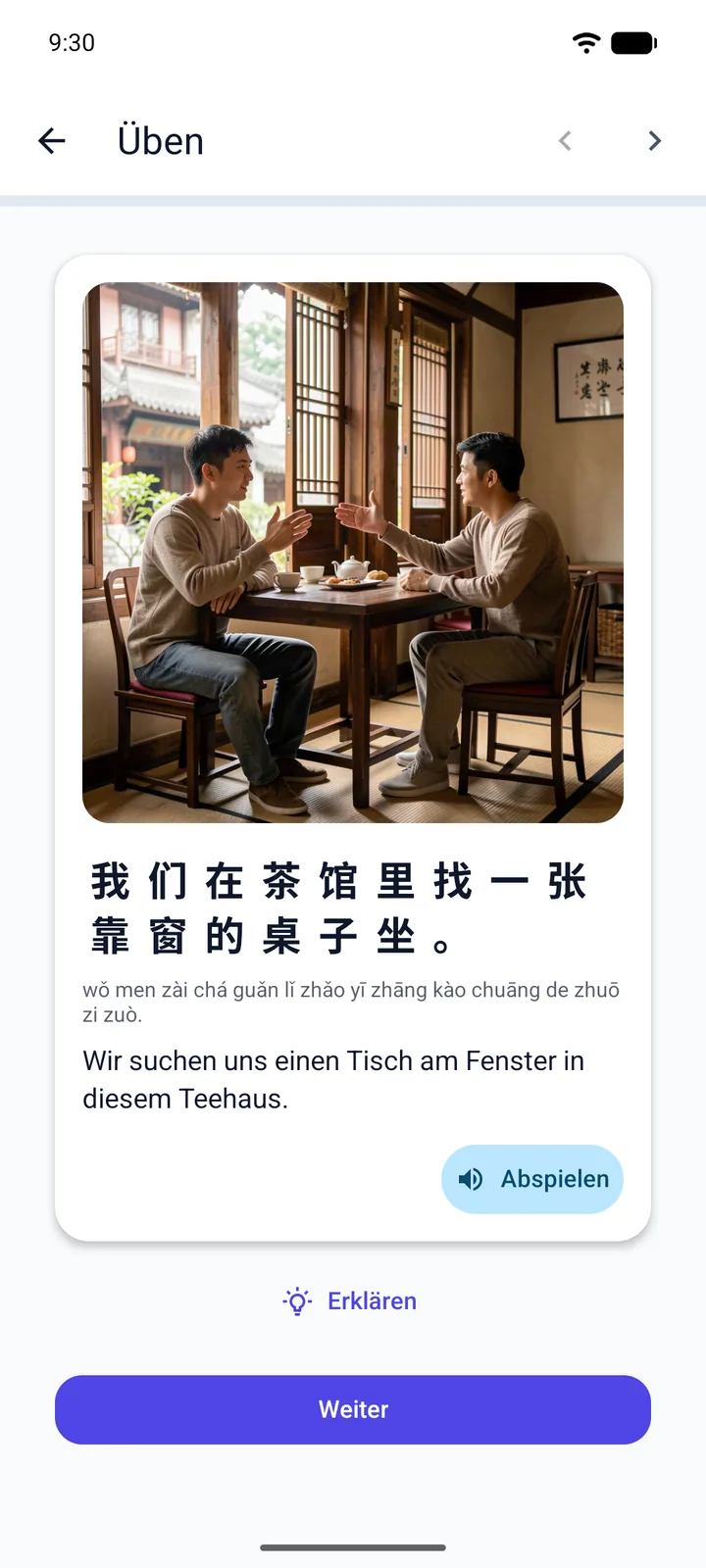
A picture, a voice, and the words — for every phrase
Generating a fresh image and a native voice for every phrase, in every session, across 40+ languages, is expensive. Most apps pick one. Many skip both. Viglot does all three — because vocabulary doesn’t stick from words alone; it sticks from how many hooks your brain can hang it on.
The picture.
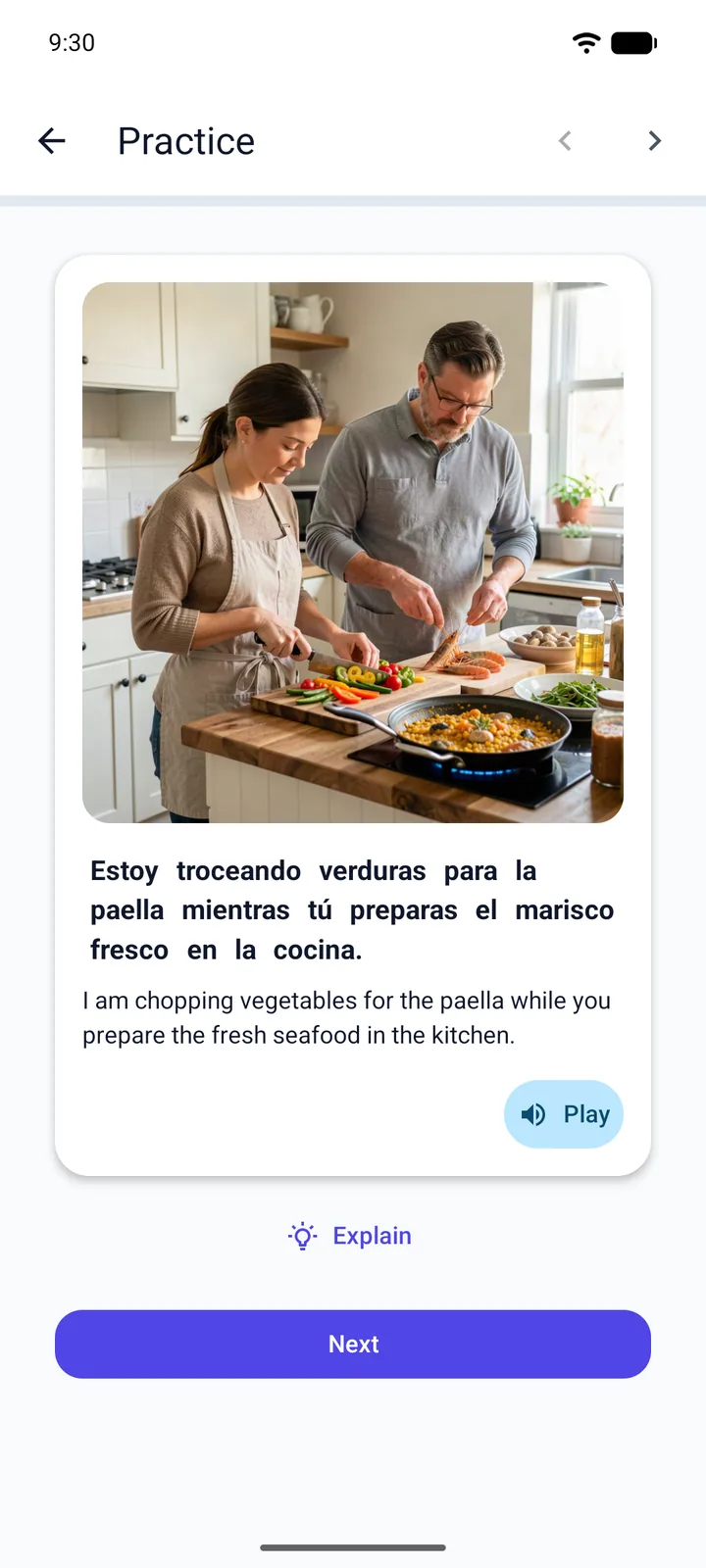
A scene generated for the exact phrase — a market stall, a doctor’s office, a contract meeting — not stock photography. The meaning gets a visual anchor before you ever read it.
The voice.
Every phrase read by a native-quality voice in your target language, every session. You hear how it actually sounds — the rhythm, the intonation, where words run together — before you ever try to say it.
The words.
The sentence on screen in your target language, with translation when you need it. Together with the image and the voice, three cues for one idea — every time. That’s encoding, not exposure.
This is what real practice looks like
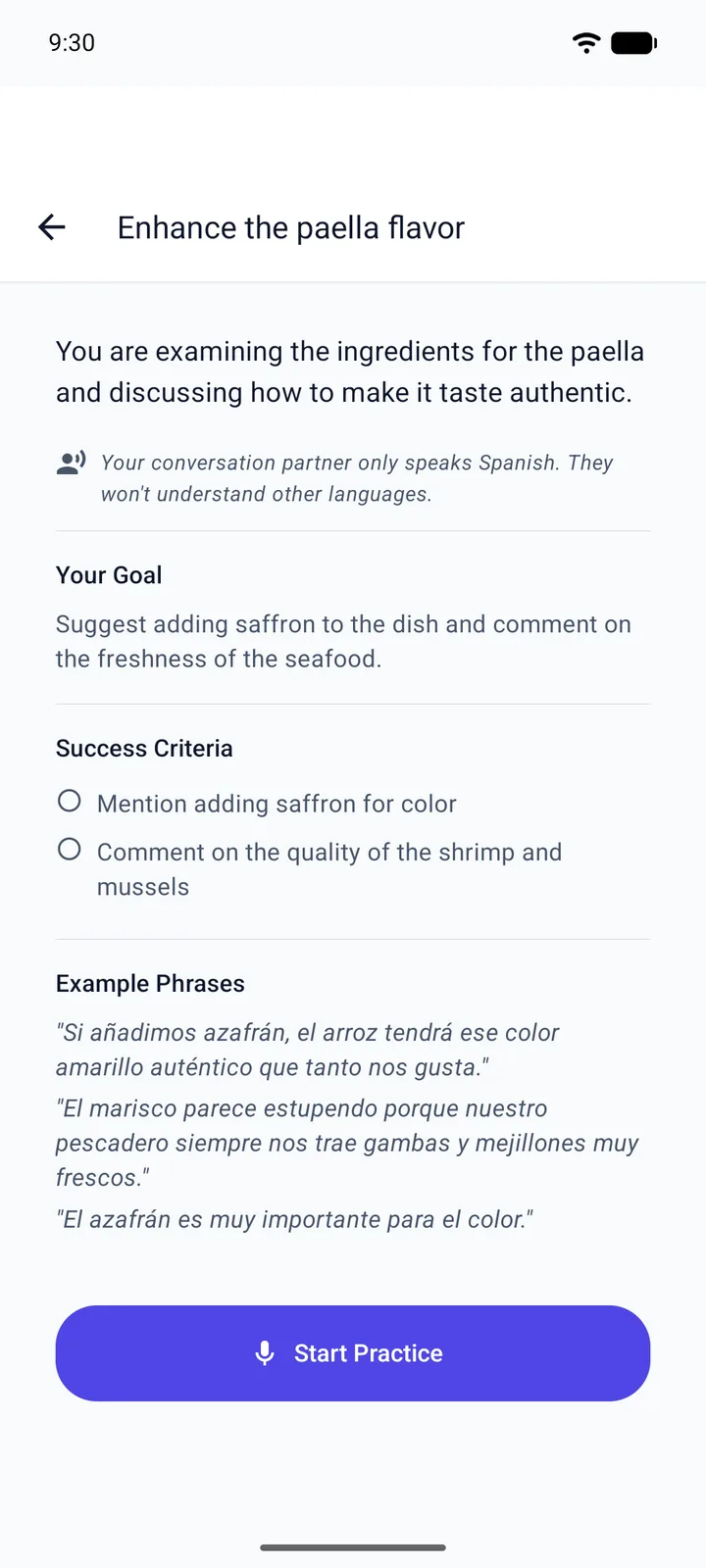
Conversations with a mission, not a chatbot.
Voice Tasks drop you into a real situation with a goal: return the faulty item, talk your way past the gatekeeper, close the deal. You speak, the AI answers in character, and at the end it tells you whether you actually succeeded — and exactly what to say better next time.
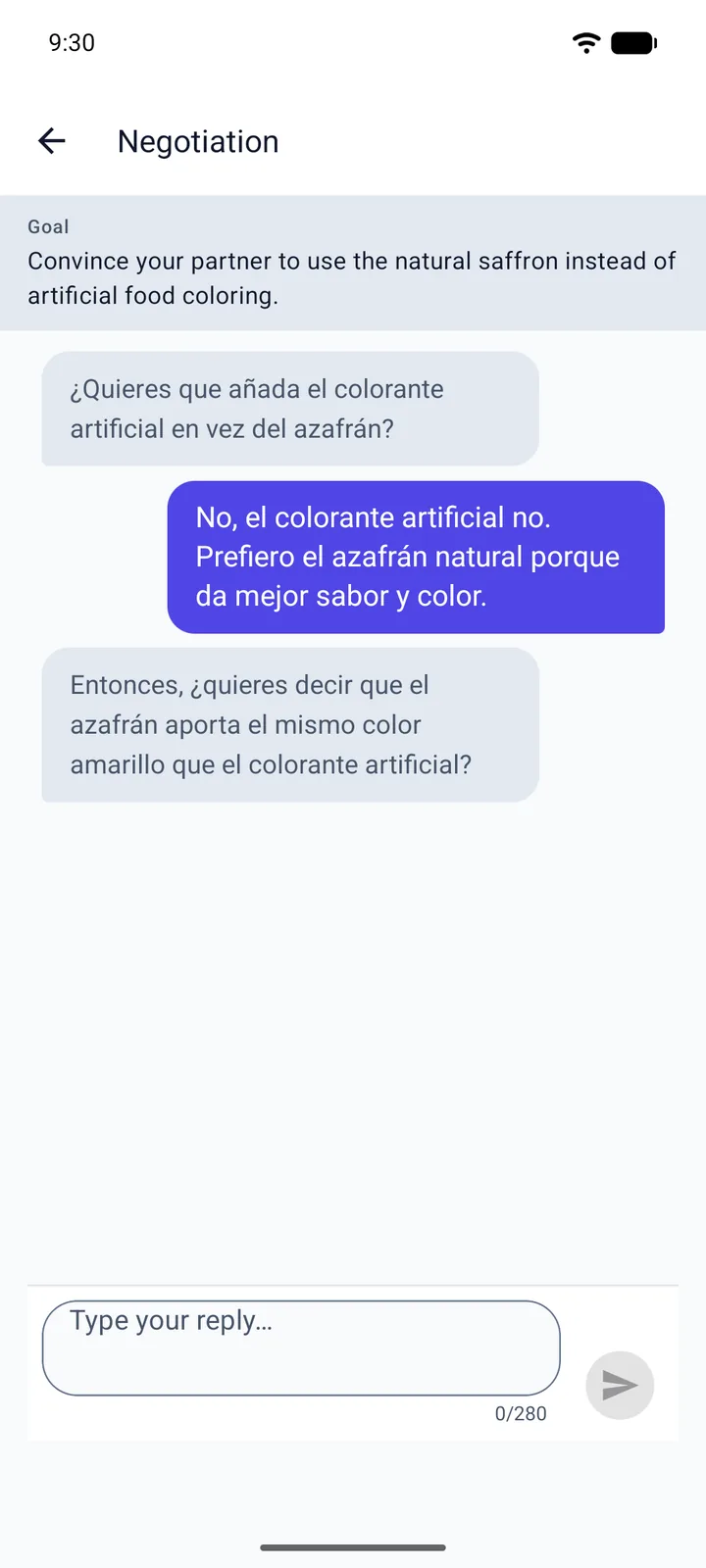
When the AI refuses to understand you.
Make Yourself Understood is the skill no textbook teaches: being misunderstood and fixing it. The AI deliberately gets you wrong, and you have to rephrase, simplify, and clarify until your meaning lands — then it grades how well you repaired it. It's the exact muscle you use in a real conversation abroad.
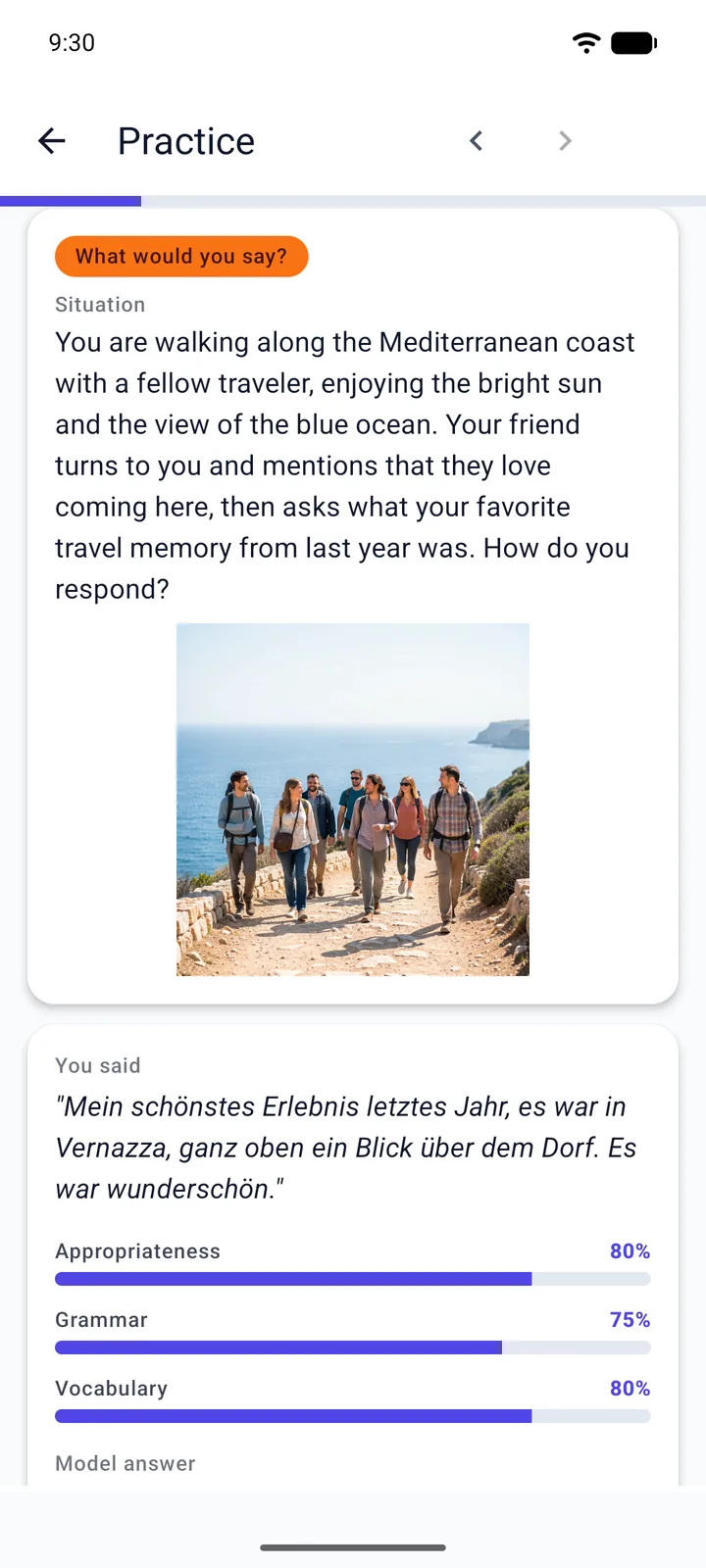
Think on your feet, in their language.
What Would You Say? shows you a situation and a picture, and you speak your response out loud — no multiple choice, no safety net. You're scored on whether it was appropriate, grammatical, and natural, plus an ideal answer in the target language to learn from.
The exercises that actually make you talk.
We lead with the ones that move the needle — real speaking, real comprehension, real nuance. Flashcards and word banks are in there too; they're just not the headline.
Voice Tasks
Hold a spoken conversation with a goal to hit. The AI judges whether you pulled it off.
Make Yourself Understood
The AI misunderstands you on purpose. Rephrase until your point lands.
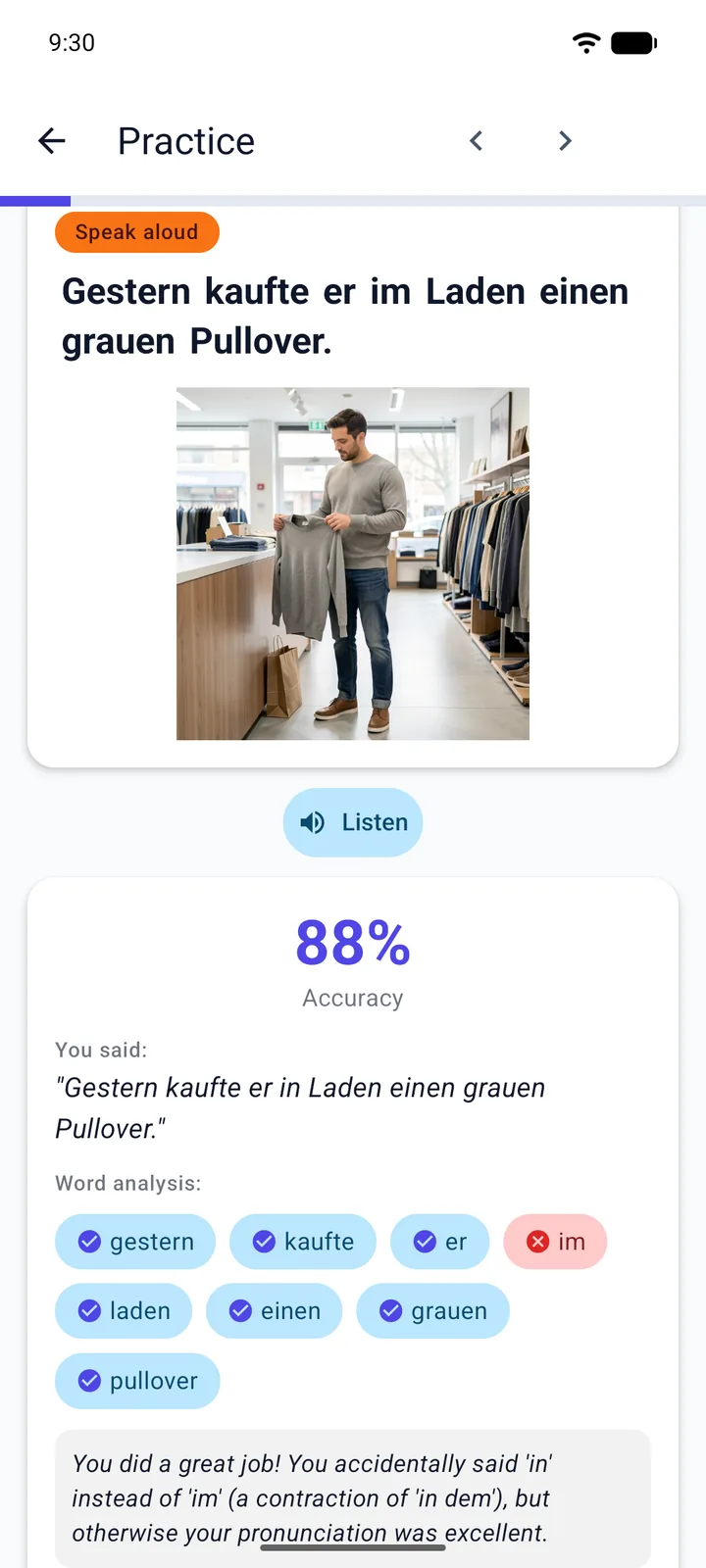 Pronunciation Practice
Read a phrase aloud and get scored on how your delivery actually came across — honest, word-level feedback, not a thumbs-up.
Pronunciation Practice
Read a phrase aloud and get scored on how your delivery actually came across — honest, word-level feedback, not a thumbs-up.
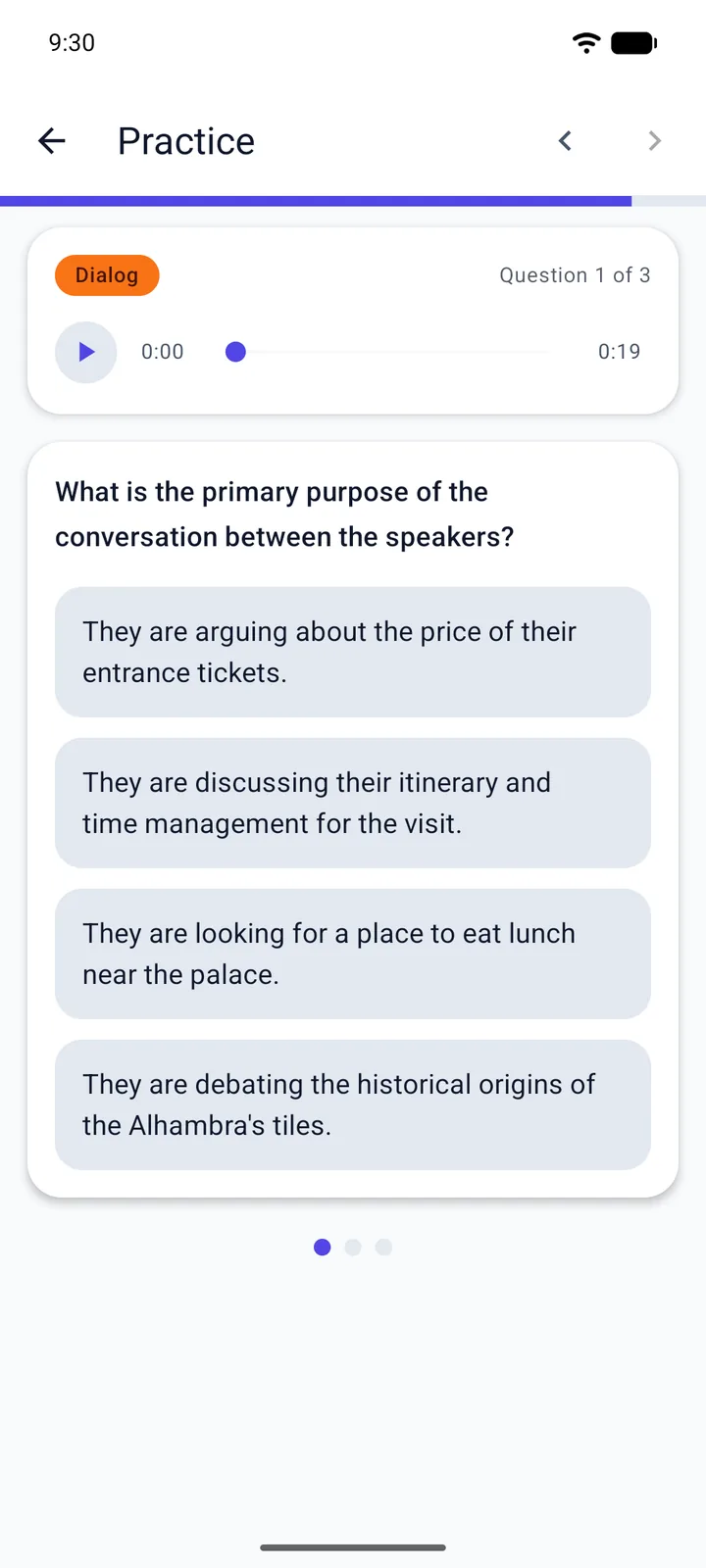 Listening Comprehension
Follow natural dialogue and monologues, then prove you caught the meaning.
Listening Comprehension
Follow natural dialogue and monologues, then prove you caught the meaning.
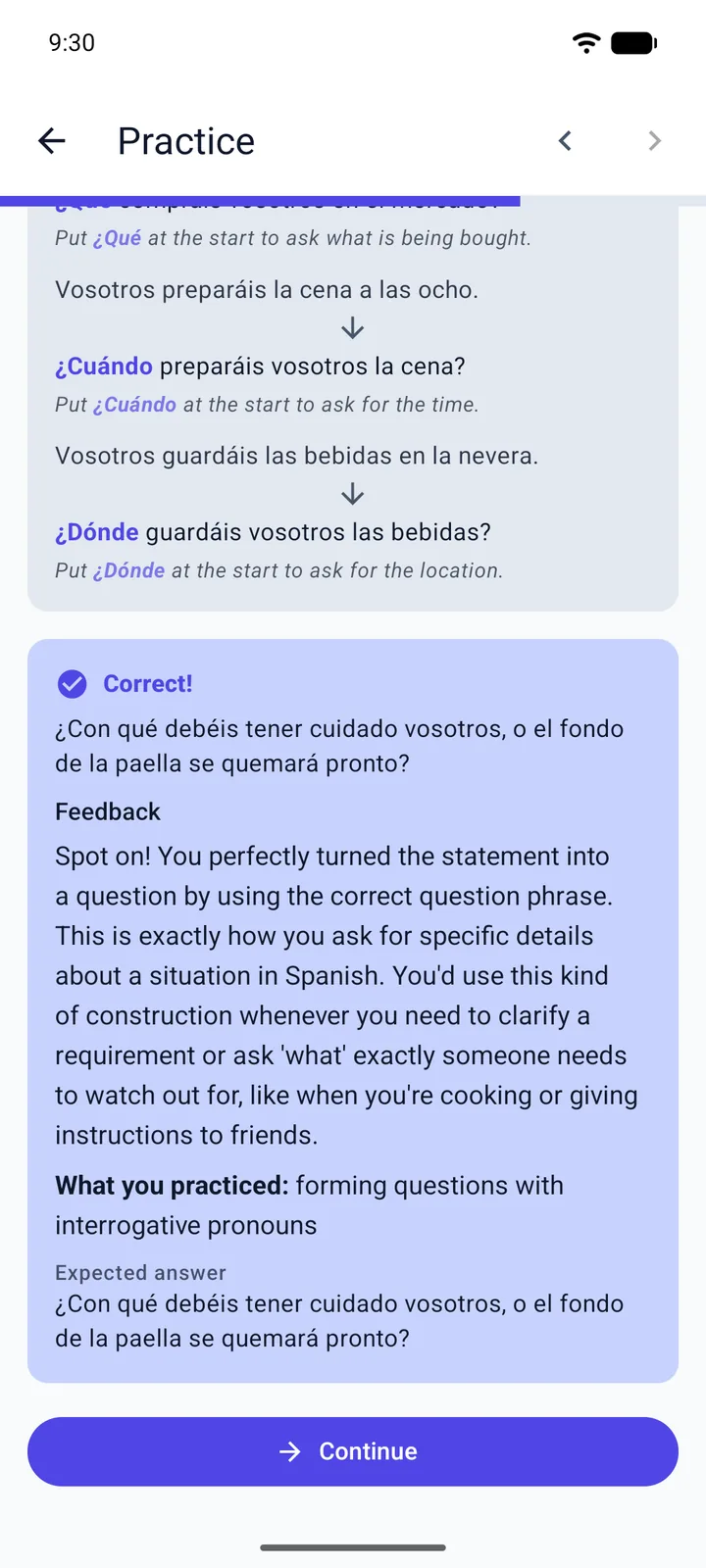 Grammar in Context
Produce the tricky form yourself. An AI grader tells you exactly what to fix.
Grammar in Context
Produce the tricky form yourself. An AI grader tells you exactly what to fix.
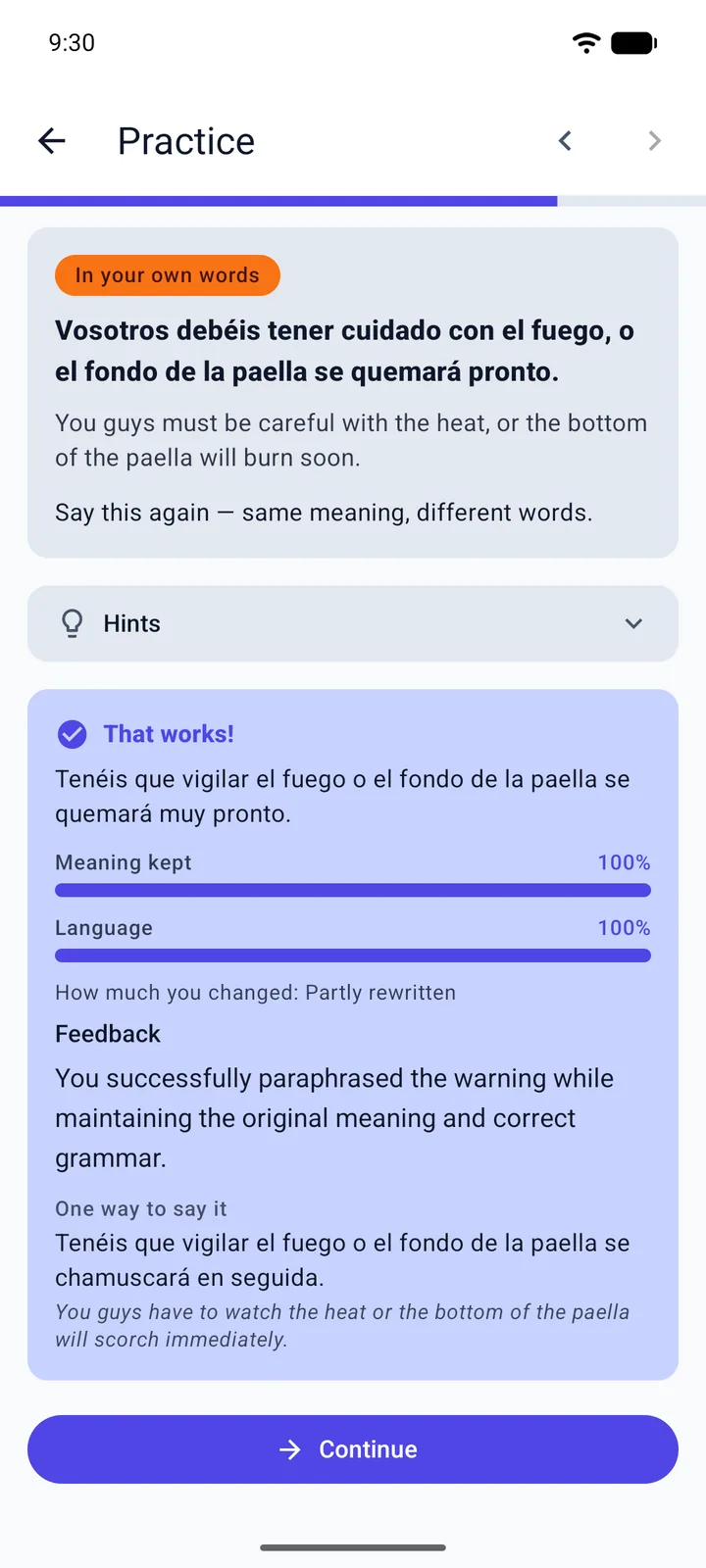 In Your Own Words
Say the phrase again in different words. You're scored on whether the meaning survived — and on the language you used to keep it.
In Your Own Words
Say the phrase again in different words. You're scored on whether the meaning survived — and on the language you used to keep it.
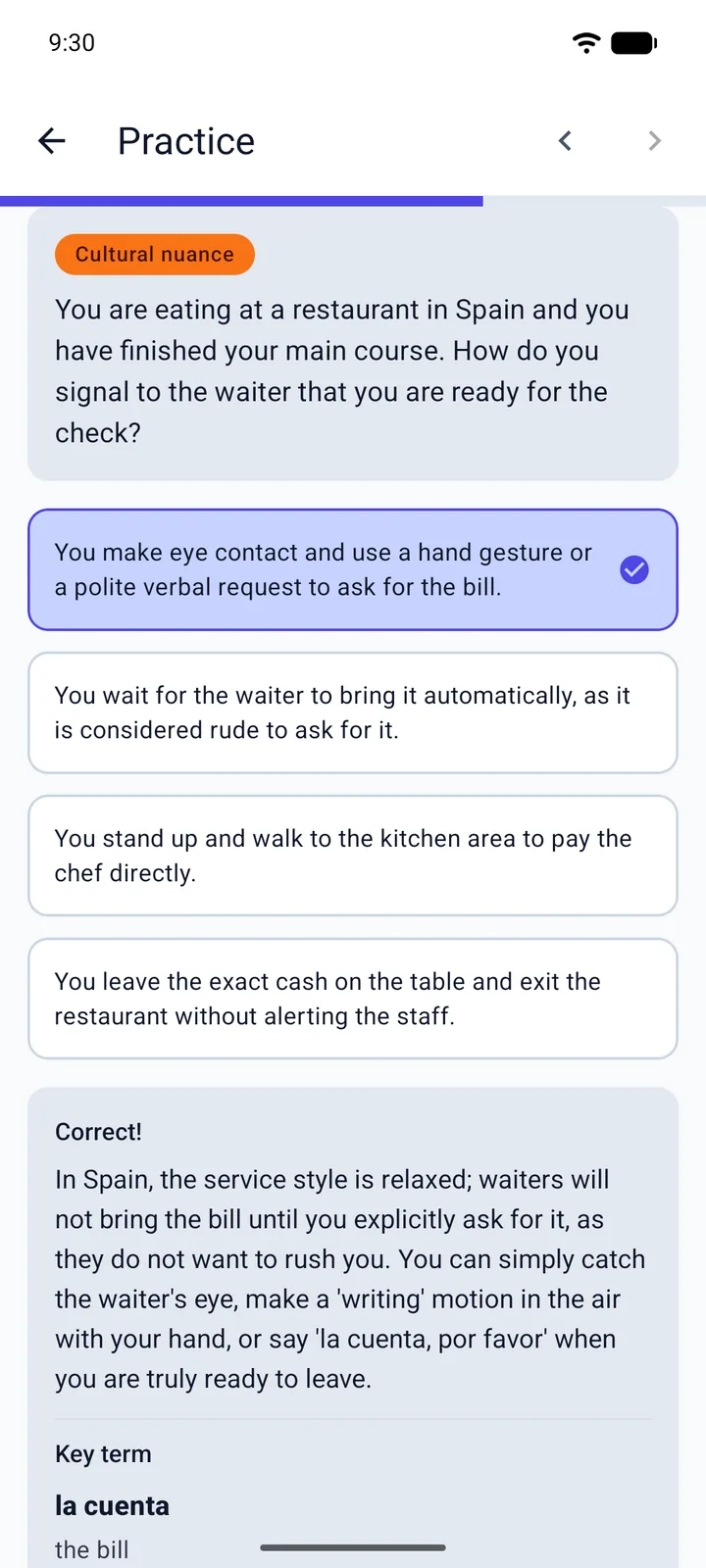 Cultural Nuance
Predict what someone local would actually do, then find out why — the custom behind the phrase, not just the words.
Cultural Nuance
Predict what someone local would actually do, then find out why — the custom behind the phrase, not just the words.
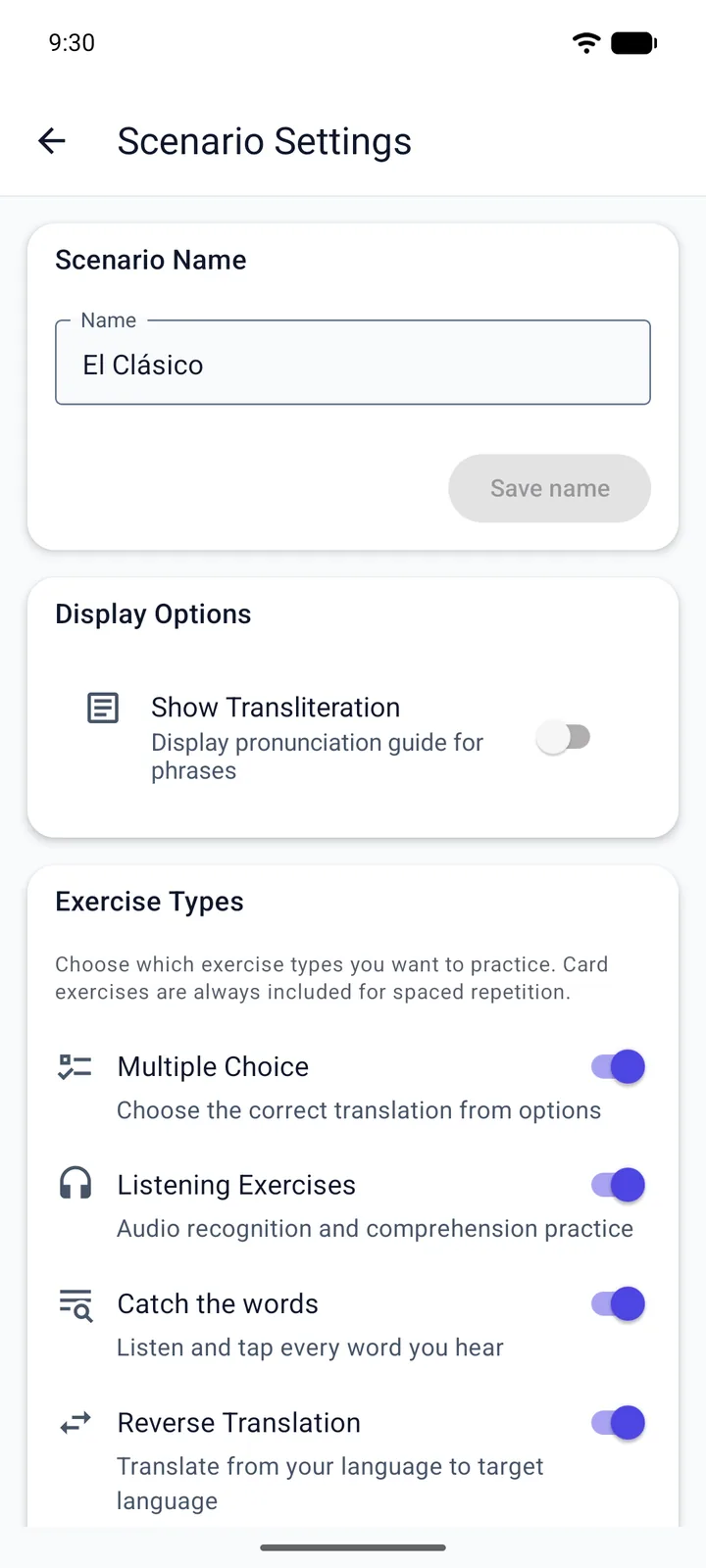
…plus the rest of the 17 — fill-in-the-blank, sentence reconstruction, error correction, word placement, minimal pairs, catch the words, and more.
Seventeen types — a menu, not a gauntlet.
Switch off any exercise type you don't want and it stops showing up. Keep what sharpens you, drop what doesn't, and shape a practice that fits how you actually learn.
Every language gets the full experience
AI-generated content means every language gets the same depth — culturally relevant scenarios, AI pronunciation feedback, and all 17 exercise types. Including full RTL support for Arabic, Persian, and Hebrew.
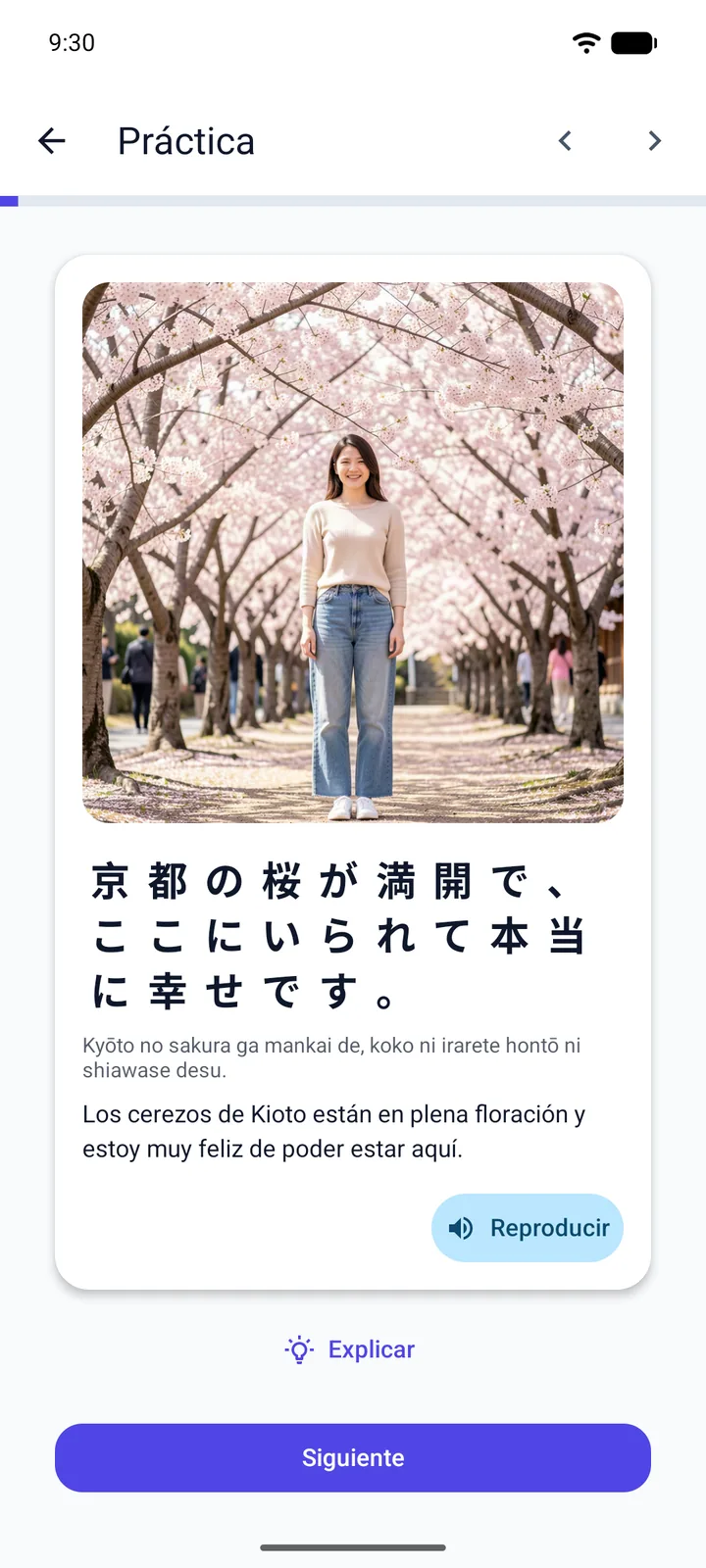
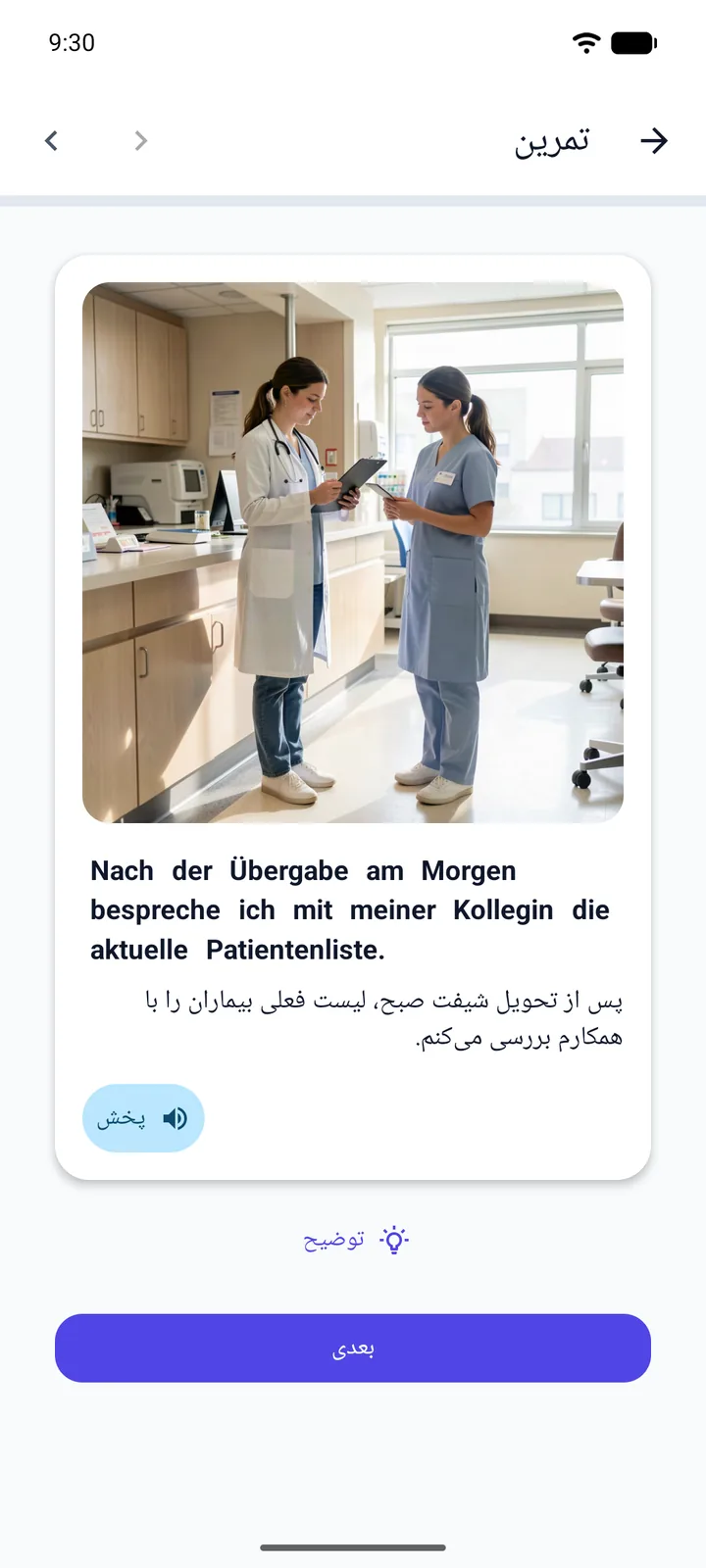
Every language. Full support.
Each language gets all 17 exercise types, pronunciation feedback, AI-generated scenarios, and spaced repetition. No language is a second-class citizen.
 Albanian
 Arabic (MSA)
 Arabic (Egypt)
 Arabic (Levantine)
 Bulgarian
 Catalan
 Chinese (Simplified)
 Chinese (HK Traditional)
 Chinese (TW Traditional)
 Croatian
 Czech
Czech
 Danish
 Dutch
Dutch
 English
 Finnish
 French
 German
 Greek
Greek
 Hebrew
 Hindi
Hindi
 Hungarian
 Indonesian
 Italian
 Japanese
 Korean
 Malay
Malay
 Norwegian
 Persian
 Polish
 Portuguese (Brazil)
 Portuguese (Portugal)
 Romanian
 Russian
 Serbian
 Slovak
Spanish (Latin America)
Spanish (Spain)
Slovak
Spanish (Latin America)
Spanish (Spain)
 Swedish
 Thai
Thai
 Turkish
 Ukrainian
 Vietnamese
From install to progress in minutes
Pick any two languages
Spanish from English, Persian from German, Chinese from French — any combination. Tell Viglot your level and what you’re into, and the AI builds scenarios, phrases, and vocabulary around what actually matters to you.
Work through a scenario
Each scenario is a coherent situation with 17 exercise types, voice tasks, and listening comprehensions. A structured progression moves you from recognition to active production. Speech exercises let you record yourself and get AI feedback.
Review and retain
Spaced repetition schedules your reviews at optimal intervals. Track your speaking practice, vocabulary growth, and daily streak. Watch your fluency grow as the content keeps pushing you — from intermediate into advanced territory.
Frequently asked questions
I’ve used other apps and still can’t speak. Why would this be any different?
Most apps reward recognition — picking the right answer from four choices. Viglot only counts a word as learned once you’ve produced it yourself: said it out loud, rebuilt the sentence, placed it back in context. Production is what builds vocabulary you can actually use when speaking.
Will I actually remember the words long-term, or just until the next session?
That’s the goal. Every word you see is tracked and resurfaced at intervals tuned for long-term retention. Nothing disappears into a ‘completed’ folder — words cycle back until they’re stable in memory.
Can I choose which exercises a scenario uses?
Yes. Every scenario has an exercise menu — turn any type on or off, even in the middle of a session, and the lesson reshapes on the spot without losing your progress. Want pure speaking practice? Switch off everything but the speaking exercises. In the mood for a grammar grind? Keep just those. It’s your call, every time.
Which exercises will I see at my level?
Each CEFR level starts with the exercises that help most at that stage — recognition and word banks early on, production and nuance as you climb, pronunciation easing off near the top. Everything below is just the default — you can override almost every row per scenario.
| A1 | A2 | B1 | B2 | C1 | C2 | |
|---|---|---|---|---|---|---|
| Flashcards & word banks | ● | ● | ○ | ○ | ○ | ○ |
| Recognition & listening match | ● | ● | ○ | ○ | ○ | ○ |
| Production drills (fill-in, reorder, rebuild) | ● | ● | ● | ● | ○ | ○ |
| Error correction | ○ | ● | ● | ● | ● | ● |
| Pronunciation & speaking | ● | ● | ● | ● | ○ | ○ |
| Listening comprehension | ● | ● | ● | ● | ● | ● |
| Cultural nuance | ● | ● | ● | ● | ● | ● |
| Grammar exercises | — | ● | ● | ● | ● | ○ |
| What Would You Say? | — | ● | ● | ● | ● | ● |
| Voice Tasks & Make Yourself Understood | ● | ● | ● | ● | ● | ● |
| In Your Own Words | — | ● | ● | ● | ● | ● |
- ● On by default
- ○ Available — turn it on
- — Not at this level
- ★ Premium
Defaults only — you can override almost any row per scenario. Grammar exercises, “What Would You Say?” and “In Your Own Words” aren’t offered at A1, where they wouldn’t help yet, and pronunciation eases off at C1–C2 (still toggleable).
What level is Viglot for — am I too advanced, or not ready yet?
Viglot supports the full range, A1 through C2, and it’s tuned for intermediate and advanced learners (B1+) who keep stalling on the same plateau. Beginners are welcome — the early levels lean on recognition and word banks to build a base — but if you’re starting from absolute zero, a foundational course first won’t hurt. The further along you are, the more the speaking, nuance, and comprehension exercises have to give you.
What are the exercise types?
Seventeen in all: voice tasks, Make Yourself Understood, What Would You Say?, In Your Own Words, listening comprehension (dialogue and monologue), cultural nuance, grammar exercises, pronunciation and speech, fill-in-the-blank, sentence reconstruction, error correction, word placement, reverse translation, minimal pairs, Catch the words (tap the words you hear), flashcards, and multiple choice. The first eight are Premium and the rest are free. The Premium ones — speaking, live conversation, comprehension and nuance — are where the real progress happens.
How long until I can hold an actual conversation?
It depends on the language and how often you practice. With fifteen minutes a day, most learners notice a real difference within a few months. Not a week — anyone telling you that is selling something.
What languages are supported?
40+ languages including Spanish, French, German, Arabic, Persian, Chinese, Japanese, Korean, Turkish, Russian, and more — in either direction. Right-to-left languages like Arabic, Persian, and Hebrew are fully supported.
Is the content AI-generated?
Yes, and that is the point. A fixed curriculum gives everyone the same lesson tree, the same topics, the same examples. Generation means your scenarios are built around your life: your job, your hobbies, the conversation you actually have to have next week, at your exact level, in any pair of 40+ languages. The images are AI-generated too, one for every phrase, and the voices are synthesized to native quality, so you learn from a scene, not a word list. Your conversation partner answers in character, judges whether you reached your goal, and tells you what to say better next time, at any hour, for as long as you want to practice. Difficulty follows what you actually retain instead of a syllabus. The content is new every session, so you never run out, and it respects the dialect you chose, so Egyptian Arabic sounds Egyptian. Speech recognition can still mishear you now and then; the feedback is a signal, not a verdict.
Is it free?
Yes, to start. The free version covers the core practice loop: scenarios built around your topics, the core exercises and spaced repetition, with a limited number of new scenarios each week. Premium unlocks every speaking and comprehension exercise — pronunciation, voice tasks, Make Yourself Understood, What Would You Say?, In Your Own Words, listening comprehension, cultural nuance and grammar exercises — plus many more new scenarios. You can try all of it free during the trial, no credit card needed.
How do I get the app?
Viglot is out now on iOS and Android — download it from the App Store or Google Play, sign up in the app, and you’re ready to go.
Start free. Go Premium when you’re ready to speak.
The free version gives you the core practice loop. Premium adds every speaking and comprehension exercise, the ones that turn words you recognize into words you can use.
Free
- Scenarios built around your topics, with an image and a native voice for every phrase
- The core exercises: flashcards, multiple choice, fill-in-the-blank, sentence reconstruction, error correction, word placement, reverse translation, minimal pairs and catch the words
- Spaced repetition that brings every word back before you forget it
- A limited number of new scenarios each week
Premium
Everything in Free, plus:
- Voice Tasks and Make Yourself Understood: spoken conversations with a goal and an honest verdict
- Pronunciation practice and What Would You Say?, with feedback on what you actually said
- Listening comprehension, cultural nuance, grammar exercises and In Your Own Words
- Many more new scenarios every week
Not sure yet? Try every Premium exercise free during the trial, no credit card needed.
Stop practicing sentences you’ll never use.
Scenarios built around what you care about. Speaking practice with AI feedback. Conversations with real goals. Across 40+ languages — at the level you’re actually at.
Download Viglot
Free to start. Try every Premium exercise free during the trial.